If you own a PlayStation 4, keeping your system updated is important for stability, security, online compatibility, and access to the latest features. But manually checking Sony’s servers every time can get annoying, especially for developers, modding communities, repair technicians, or users who frequently reinstall firmware files.
That’s where PS4 Firmware Scanner becomes incredibly useful.
This lightweight Windows tool was designed to automatically monitor official PlayStation firmware servers and instantly detect when a brand-new PS4 update is released. Instead of searching online for firmware files, the application checks Sony’s XML update servers directly and gives users a fast and simple way to download the official .PUP firmware package.
What Is PS4 Firmware Scanner?
PS4 Firmware Scanner is a desktop utility developed for Windows that scans PlayStation update servers and identifies the latest PS4 firmware available.
The tool automatically:
- Checks for new firmware updates
- Detects version changes
- Retrieves the official firmware download URL
- Downloads the original PS4
.PUPfile - Displays download progress in real time
- Prevents duplicate firmware downloads
- Supports English and Brazilian Portuguese automatically
Unlike random third-party firmware sites, the application pulls information directly from Sony’s official update XML database, which helps ensure the firmware files are authentic and up to date.
Why This Tool Is Useful
Many PS4 users only update their console directly through the system menu. However, there are situations where downloading the firmware manually is necessary.
Some common examples include:
- Reinstalling PS4 system software
- Fixing corrupted firmware
- Initializing a console
- Offline updates
- Repair shop maintenance
- Development and testing environments
- Monitoring firmware releases
Instead of manually refreshing websites every day, PS4 Firmware Scanner automates the entire process.
The software continuously checks for updates in the background and immediately alerts the user when a new firmware appears on Sony’s servers.
Main Features
Automatic Firmware Detection
One of the best features is automatic scanning.
The application periodically checks Sony’s update server XML feed and compares the newest firmware version against the previously detected version saved locally.
If a new firmware is found:
- the status changes instantly,
- the download button becomes available,
- and the new version information appears automatically.
Official Sony Download Links
A major advantage of the tool is that it uses official PlayStation update links.
Instead of downloading from mirrors or unknown websites, the application retrieves the direct firmware URL from Sony’s servers.
This improves:
- reliability,
- authenticity,
- and download safety.
Integrated Firmware Downloader
The software also includes a built-in downloader.
Users can download the .PUP firmware directly inside the application without opening a browser.
Features include:
- real-time progress bar,
- percentage tracking,
- completion messages,
- automatic file saving,
- and download status updates.
Duplicate Download Protection
A very useful feature is duplicate detection.
After a firmware version is downloaded, the application stores that version locally. If the user tries downloading the exact same firmware again, the software shows a warning instead of downloading it another time.
This helps:
- avoid wasted storage,
- reduce bandwidth usage,
- and prevent accidental duplicate downloads.
How the Software Works
Internally, PS4 Firmware Scanner reads Sony’s PS4 update XML feed.
The tool parses firmware data such as:
- firmware version,
- update metadata,
- and direct
.PUPdownload links.
The application then compares the detected version with:
- the previously scanned version,
- and the previously downloaded version.
This allows the software to:
- identify new updates,
- activate the download system,
- and avoid repeated downloads.
Lightweight and Simple Interface
Another great aspect of the software is its simplicity.
The interface is intentionally lightweight and clean, making it easy for beginners to use.
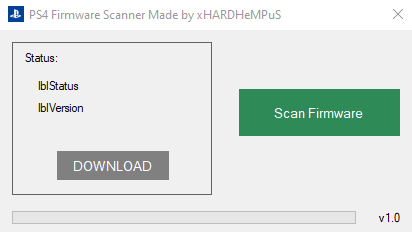
Typical interface components include:
- firmware version display,
- update status label,
- scan button,
- download button,
- and a progress bar.
Everything is designed to work quickly without unnecessary menus or complex setup steps.
Ideal for Repair Technicians and Enthusiasts
This tool is especially useful for:
- PS4 repair technicians,
- firmware collectors,
- console enthusiasts,
- developers,
- and advanced users.
People who regularly reinstall PS4 firmware often need fast access to the latest official .PUP files. Having an automated scanner saves time and reduces the risk of downloading outdated firmware.
Future Possibilities
PS4 Firmware Scanner already offers solid functionality, but there are many exciting possibilities for future updates.
Potential future features could include:
- PS5 firmware support
- download history
- firmware changelog viewer
- dark mode
- automatic firmware backup
- notification sounds
- multi-region firmware scanning
- update logs
- portable mode
These additions could make the software even more powerful for advanced users.
Final Thoughts
PS4 Firmware Scanner is a practical and efficient utility for anyone who wants a faster way to monitor and download official PS4 firmware updates.
By connecting directly to PlayStation update servers, the tool eliminates the need for manual searches and simplifies firmware management. Features like automatic update detection, integrated downloading, progress tracking, duplicate prevention, and multilingual support make it especially useful for enthusiasts and technicians alike.
For users who frequently work with PS4 systems, this lightweight firmware scanner can save time, improve workflow, and provide a safer way to obtain official firmware files.